Property page integration
View file hashes directly in the Windows Explorer Properties dialog without opening another tool.
 Verity
Windows file integrity verification
Verity provides Windows property page hash viewing, a standalone viewer, and one-click installation to help you verify file integrity quickly and reliably.
Features
View file hashes directly in the Windows Explorer Properties dialog without opening another tool.
A lightweight app for opening files from the command line or file picker and copying hash values.
Supports CRC32, CRC64, MD5, SHA-1, SHA-256, SHA-384, SHA-512, and more.
The installer embeds required components and supports per-user install and uninstall without admin rights.
Select any algorithm row and copy the result for verification, records, and sharing.
The source remains in a private development repository; the public site provides release notes and installer downloads only.
Product screenshots
Use the context menu for quick access, the Explorer property page for in-place verification, or the standalone viewer for direct file checks.
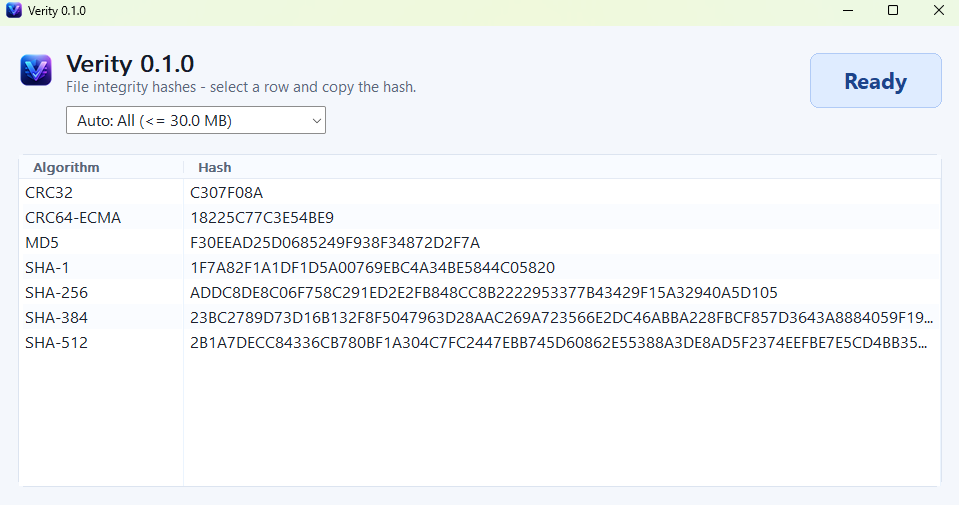
Standalone viewer
The standalone viewer keeps the current Auto mode, uppercase hash values, and clean two-column results visible in one window.
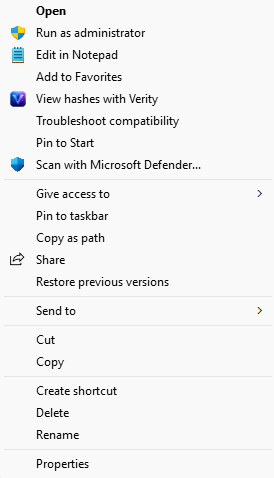
Context menu
Launch Verity directly from the Windows right-click menu when you need a quick check.
Property page
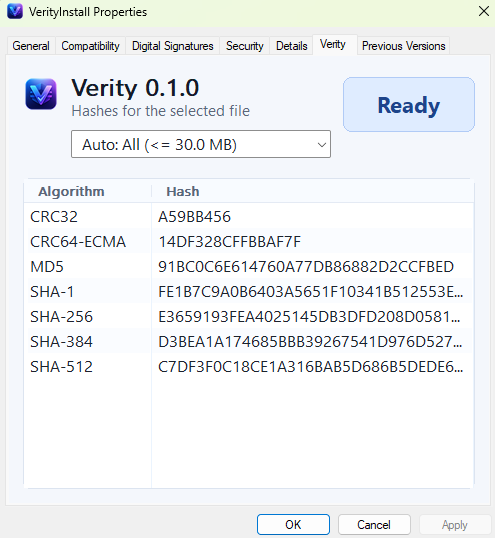
The Verity tab shows the same Auto mode and uppercase hashes inside the file Properties dialog.
Preview Notice
Verity is in early testing. The public Verity-site repository is used only for installers, release notes, and feedback entry points; the full application source will be published after the preview stabilizes.
Quick Start
Start using Verity in three steps.
Download the current preview installer from the release section below.
Run the installer and complete the per-user installation.
View and copy file hashes in the property page or standalone viewer.
Release
Windows x64 preview installer with one-click per-user install and uninstall. The package is built from the private development repository and published to the public Verity-site Release.
Verity requires Windows 10 or later.